Carl's Sims 3 Guide - Skills, Traits, Careers, Rewards, and Lifetime Wishes for Ambitions and World Adventures

The Sims 3 Guide to Roaring Heights World

Town Maps for Collectibles, Screenshots and The Boardwalk's Amusement Park/Roller Coaster

The Sims 3 Roaring Heights Town Guide Sections
Jump To:PicturesBoardwalkRollercoasterFixer-Upper CarMaps
The Sims 3 Roaring Heights World: A picture of the town
Click to Enlarge and see a beautiful view of the Town of Roaring Heights

The Sims 3 Roaring Heights is a World released by EA on December 12, 2013. The World was released in tandem with a new special set/lot called The Boardwalk, which comes with parts to allow you to Build your own Rollercoaster. At this time, Roaring Heights also comes with the Classically Cool Fixer-Upper Car, which your Sim can work on to raise their Handiness skill while improving the car's engine and appearance. This Guide will focus on both the World's collectible locations and provide maps, while also looking at any interesting new lots and means for Sims to have fun. You can purchase all this new content by following these links: Roaring Heights, The Boardwalk, and the Classically Cool Fixer-Upper Car. Both require Simpoints. This Guide will show enough pictures and details about the new bundle that will let you decide if you want to let your Sims live in this new Town by coughing up the money.

Roaring Heights Town Theme
Roaring Heights is a town that pays tribute to the Roaring Twenties in the United States, populated with Sims wearing period-specific clothing and featuring enough unique outfits to give your own Sims this vintage look. Playing in the town after experiencing Into the Future, it is quite fitting that EA lets us now go back to enjoy the past. With the Skyscrapers and classic architecture on all pre-built homes, it feels like playing in 1920s New York, with beachside amusement park and a booming downtown area. What feels out of place are the modern cars on the roads; Seeing SUVs and sports cars driving around messes with the experience, but this is The Sims we're talking about, so if we have Aliens, Unicorns, and Vampires running around, we can deal with this. What is disappointing is that we are only given one classic car, which is the Fixer-Upper and other Sims may be driving vehicles from the Future. It is almost like your Sims are living in a town that never evolved to modern fashion and instead stuck with their old clothing, whilst keeping the classic architecture but using modern technology.

Pictures of the Town of Roaring Heights

Roaring Heights features some great looking art deco architecture. Since one of the things people will be looking for in a new World from the Sims Store is new scenery to enjoy while playing, here are a series of screenshots showing off various areas of Roaring Heights. You may click any of these pictures to see a larger, more detailed version.

The Sims 3 Roaring Heights World: Town's City Hall is Beautiful
Roaring Heights Town City Hall
The Sims 3 Roaring Heights World: Town Bistro and Science Building
Town Bistro and Science Center
The Sims 3 Roaring Heights World: Town Lighthouse
Roaring Heights' Lighthouse
The Sims 3 Roaring Heights World: Town Hospital design
Town Hospital
The Sims 3 Roaring Heights World: The Beachfront
A view of the Beachfront
The Sims 3 Roaring Heights World: Town Center
Roaring Heights Town Center at Night
The Sims 3 Roaring Heights World: Bridge and Stadium in Town
A bridge and the town's Stadium
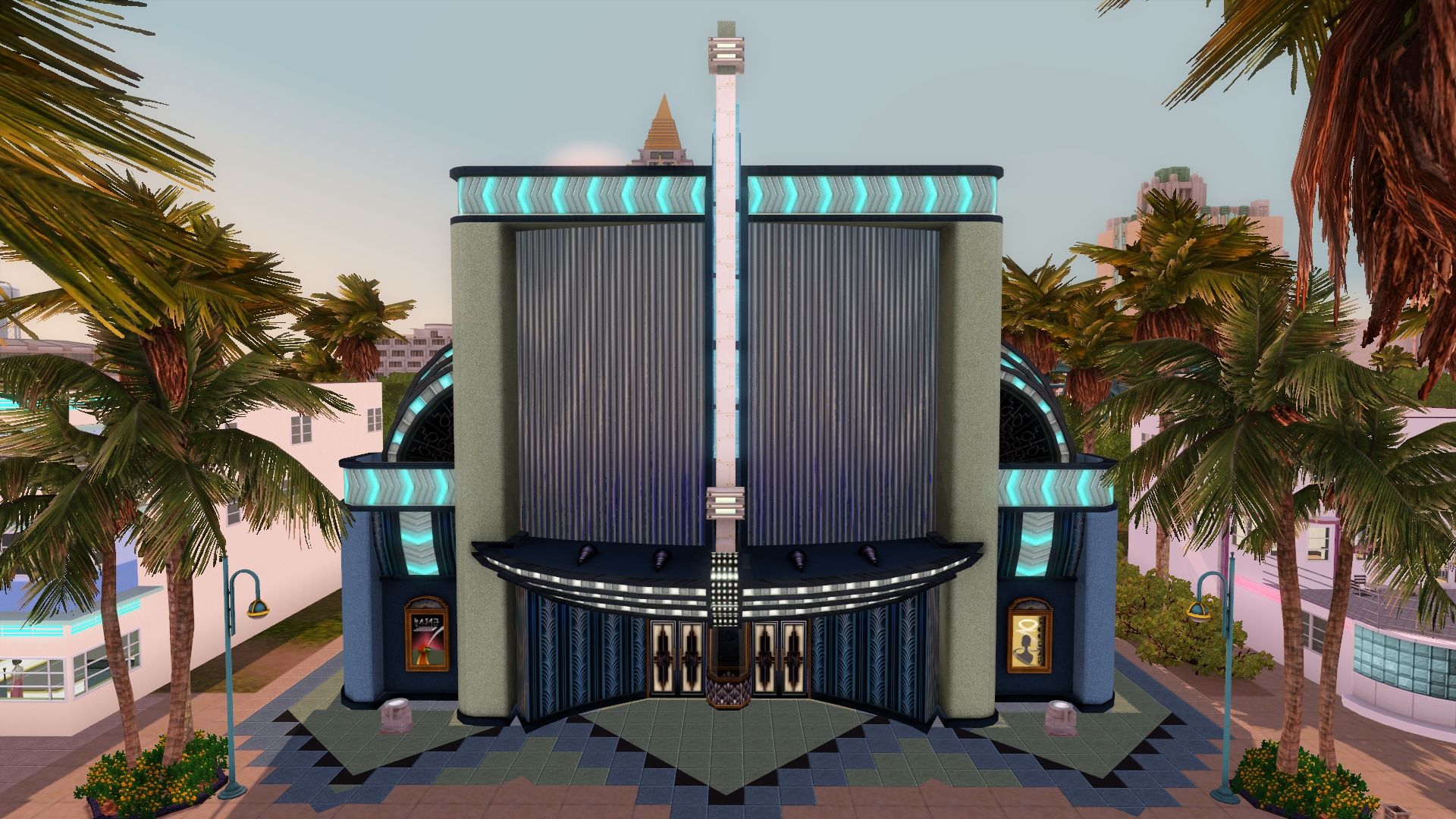
The Sims 3 Roaring Heights World: the Theater in Town
Town Theater

Clothing

In the new clothing department, you won't find many means of making custom looks for there are not tops/bottoms for each clothing category, but mainly outfits. Thankfully, males and females of all ages get clothes from this classic time period for Everyday/Formal/etc. Women have very conservative bathing suits and men can dress up as through they're businessmen from the period.

The Sims 3 Roaring Heights World: An example of male clothing in Roaring Heights
An example of Male Adult Clothing
The Sims 3 Roaring Heights World: Female Clothing in Roaring Heights
An example of Female Adult Clothing

You will want to edit the town to place lots from other Worlds and Expansions to fully enjoy this experience, so do read the section on the Boardwalk even if you don't buy it along with Roaring Heights for a little info on doing that if you don't know how.

The Boardwalk

The Sims 3 Roaring Heights World: The Boardwalk
A picture of The Boardwalk placed in Roaring Heights
The Sims 3 Roaring Heights World:
Place the Boardwalk by going into Edit Town

Placing the Boardwalk
The Boardwalk is a special Store lot that comes bundled with the parts you'll need to build a Rollercoaster, which is a suggested purchase along with Roaring Heights but not required to enjoy the town. You can place the Boardwalk in any of your towns, and also build the Rollercoaster there. Playing in Roaring Heights, you'll need to place it yourself to enjoy the pre-built amusement park. It requires a 64x64 lot, which is provided near the beach as seen in the screenshot above. To place it yourself, go to Edit Town from the (...) menu and Click on Show Community Lots from the Edit Town interface. Select The Boardwalk and place it where I suggest (it is a boardwalk, so belongs near the beach!). If you like, you can find another spot for the new lot. Ultimately, the coolest feature of this new lot is that you get all the pieces you need to build a Rollercoaster, as it is not a single piece, but rather a bunch of parts laid out to create the coaster that EA designed on the lot.

The Sims 3 Roaring Heights World: Boardwalk Top View
An overhead view of the Boardwalk
The Sims 3 Roaring Heights World: Rollercoaster Loop
Rollercoasters can loop - no worries on physics

The Boardwalk Lot Features
There are two Rollercoasters on the Boardwalk, one wooden, the other metallic in appearance. The blue metallic-looking one is much less extreme and seems like a kiddie coaster, while the other features a huge vertical drop that leads to a loop. Both give Sims a 2h +10 moodlet for riding, but it costs money to ride.

The Sims 3 Roaring Heights World: A Rollercoaster Drop
Dead Man's Drop looks frightening

The rest of the lot features games to play like pinball machines, pool, foozball, a place to eat hot dogs and otherwise socialize and have fun with the family. Though it appears to feature a carousel (merry-go-round) from the shapes of the rooftops, there is no such attraction. Overall, the Boardwalk fits well in Roaring Heights and enhances the theming of the town... but as stated, the real reason to buy this is to get to build Sims your own rollercoasters, which can be made on a home lot or a special lot you make in Edit town. You can make a much bigger coaster than what is premade with the Boardwalk when you take away the space used by hangout areas and the fact that they fit two in one 64x64 lot - but you wouldn't want to do this on a smaller lot, so must find or place one in the town to make your own.

Building Rollercoasters - The Sky High Rollercoaster

The Sims 3 Roaring Heights World:
Roller Coasters from The Boardwalk can ramp

You get these parts if you purchase the Boardwalk lot from The Sims 3 Store. If you want to build your own Rollercoaster with the Sky High Rollercoaster parts provided, I suggest you go into Edit Town and select a big lot. Change the lot type to Community Lot and select Visitors Allowed or Big Park from the list of lot types. You can certainly do it on your home lot, but this will save you lots of space because of the size of Rollercoasters. Once this is done, click build/buy on the lot.

You can find all the parts you need to build the Rollercoaster under Buy Mode/Sort by Function > Entertainment > Miscellaneous. Make this easier by using the filter box on the right to show only store content. Each piece costs $50-$150 if you are building it at home and the price can really add up for big coasters. While I will not do a full tutorial on building rollercoasters, you should know some basic information to get started. Know that if you are doing this from Edit Town you will have to visit the lot with your Sim to be able to check for a completed track (by clicking the track). It should be easy enough to see for yourself that everything lines up if you look carefully. The following pointers should help you build your own: The Sims 3 Roaring Heights World: a Loading Zone and Cart are necessary to start
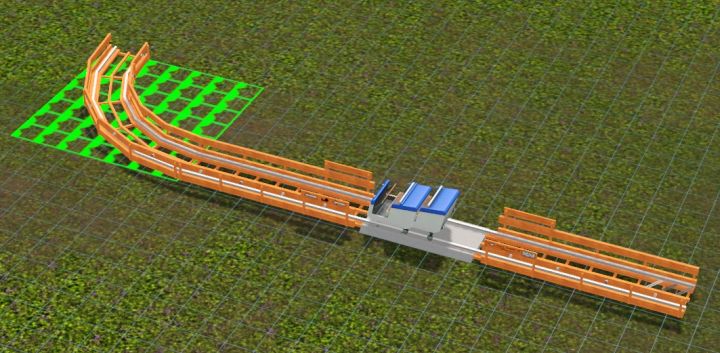
A Rollercoaster Loading Zone and Cart should be placed early, but plan carefully!

DO NOT USE MOVEOBJECTS ON TO CONNECT TRACKS - Plan carefully instead
You could waste hours. All Rollercoaster Track must connect naturally!

  • Loading Zone - select this piece to allow you to place the Rollercoaster Car. This is where all rollercoasters must start. You should place it near the edge of the lot if you want a big coaster. From there, you do not need to worry about physics like you would in a game like Rollercoaster Tycoon. Coaster Carts do not have to have enough momentum to make it over a loop. This is a simplified version of what some of us have experienced in those wonderful amusement park games.
  • Coaster Cart - You need this for Sims to ride. You may place up to two carts on the Loading Zone.
  • Plan Carefully - If you want a giant coaster, you will want to make your opening track near a corner of a huge lot (64x64 recommended) so that you can have plenty of room to complete the track. If it does not make a full circuit, Sims cannot ride.
  • The Sims 3 Roaring Heights World: Rollercoaster Supports
    Supports are not necessary once in place and can be deleted to give you more room.
  • Going High - One, Two, and Three Story Supports - These are necessary to help you elevate your Coaster Track, but can be deleted once the track is in place to allow you to have more room to go under other sections of track. You must place them in the perfect location in order for the Up and Down Ramp to appear and fit. In order to get them to ramp upward, you'll need the following item:
  • Up and Down Ramp - You need to place this on a support. You can place the support to get the ramp to appear as in the screenshot above, then adjust the ramp so that it lines up with your track, then move the support just under it. This is a little tedious, because the system requires you to make lots of little adjustments, but the end result is worth it. You can also count how many boxes away the track is from connecting to help you make the track appear in the right spot, by moving the support back a few tiles. You need to place a support about 6 tiles away for the Up/Down ramp to work. To make a high coaster, you'd start with a one story support, place a ramp, two story support, second ramp, and finally a third story support. You can place a curve in there somewhere if you like, then make the ramp go back upward.
  • The Sims 3 Roaring Heights World: Building Roller Coasters - Turns and Straights
    Constructing Turns and Straights is easy.
    You may also use longer supports specifically designed for them.
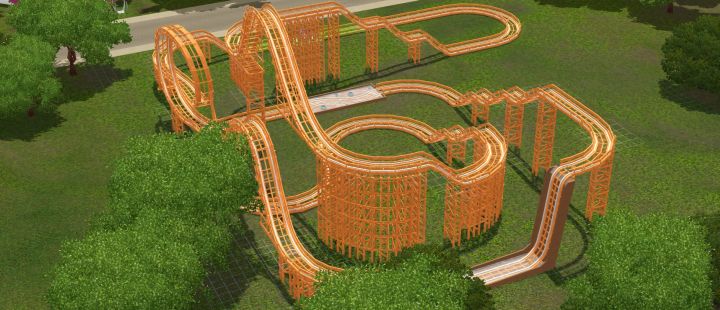
  • Turns and Straights - Thankfully, placing straights and turns on your track is easy once you have the elevation you desire. You will still need supports of the appropriate height to allow you to attach them; put them a couple tiles from the edge of your track to make this possible. The system will hook the track up (almost) automatically, just make minor adjustments to make sure the rails are perfectly aligned.
  • Rolling Down - The Up and Down ramp can obviously be used to send your Coaster back downward to make the ride more exciting, as Rollercoasters tend to do. Aside from simple curves, rises and drops, there are other things you can do to make your Rollercoaster more interesting:
  • Features - Drops, Loops, and Leaps - Dead Man's Drop is a way to get Sims back down to the ground level, and must be placed from a track three stories up. There is also the broken track, which will ramp Sims over a water puddle, something a real coaster would never do for safety reasons. The Sims 3 Roaring Heights World: Building a Rollercoaster is a rewarding experience
    A finished Rollercoaster, which took lots of tweaking to make the track fit.

    The Classically Cool Fixer-Upper Car (Premium Content)

    The Sims 3 Roaring Heights World: Classically Cool Fixer-Upper Car
    Driving at the Beach in the Classically Cool Fixer-Upper Car

    Turning Handiness into a Profit or Building a Sweet Ride
    The Classically Cool Fixer-Upper Car is a cool addition to the game that is currently included with Roaring Heights. It's a great cheap gift ($350) to give a Teen to let them gain some skill and make their own car. This gives your Sim an opportunity to take on a long project to repair and do body work on the car to make it a beautiful classic with a roaring and powerful engine. 'Work on Car Body' and 'Work on Car Engine' are identical interactions, only different animations. Both will somehow work on the body and engine to produce a fully completed car. Your Sim can turn on the car's radio to make this experience more enjoyable and keep their mood up; Sims can even dance to the Car's tunes. When the car's Fix-up is complete, your Classic Car will need a parking space on your home lot and may be set as the preferred vehicle for one of your Sims.

    The Sims 3 Roaring Heights World: Car before Fixing it
    This Car needs a lot of work

    Once the car is fixed up and has a nice body, you can wax it to further improve your Sim's Handiness and have some fun. If you worked on the body first, working on the Engine until complete will make it faster. When the car is done and ready to be sold or driven, you'll get a Purrs like a Lion moodlet by Revving the Engine, although your Sim can continue to work on the engine to further their Handiness. It doesn't seem to do more for the vehicle at that point, but can get you to level 10, which will give you access to all upgrades around your Household.

    To customize the color of your classic car, go into Buy Mode and press R for Create-a-Style. From there, you can apply any color or pattern to your car to change it from the yellow.

    There are several romantic moodlets based around actions your Sims can take in the Fixer-Upper. Looking at Stars with a loved one will give the Starry-Eyed moodlet. Making out will give them 'Second Gear', a reference to Second Base. Woohooing in the Car will result in a 3h +20 moodlet for joining the 'Fifth Gear' club. Sims also get a moodlet for revving the engine when it's in good shape: Purrs like a Lion for +15 for 2h.

    The Sims 3 Roaring Heights World: The Body Fixed, the Car is ready to drive
    This Classic Car is ready to drive once the Body or Engine are fixed.

    Once the Fix-up is complete, the Classically Cool Fixer-Upper Car can be sold through Buy mode for a profit - upon which time you could buy another and fix it up to make a career out of it. A Handy Sim will complete the car faster, although Handiness level does not matter for speed (I did a race between two Sims to test this). I have seen the Car sellable for $39,000, but the price will fall. I suspect this is due to depreciation of the Car like most owned objects, so you should probably sell it immediately when finished to prevent losing the extra money. Overall, fixing up this classic car is an amazing profit for a few days' work and a great gameplay addition from Roaring Heights, allowing you to make your own car or earn cash from your Sim's Handiness skill!

    Collectible Maps for Roaring Heights

    Pink Diamonds, Palladium, Special Seeds & Useful Fish Spawners

    About the Maps
    First, know that the Death Fish Spawner in Roaring Heights is not working. It is in the Graveyard as you would expect, given that is the location in almost every town, just as Robot Fish are found outside Science Facilities. Use Testingcheatsenabled true and Buydebug on to place your own. To read more about editing lots that are not your own with testingcheats, read the Cheats page. The Spawner you need is Fish Graveyard/Death Fish. The place the Deathfish is supposed to spawn is noted on the map, but crossed out for the time being until I hear it's been fixed. Else, players will have to do this themselves if they want to make Ambrosia.

    Now on to the Roaring Heights maps. You may click each map to see a larger picture:

    Collectible Map Key
    Map Key from the Dragon Valley Guide, created by Ricalynn

    Roaring Heights collectible map near the airstrip
    Collecting Spots for Palladium, Rare Butterflies, and Rainbow Gems

    Roaring Heights collectible map near the beach front
    Collecting Spots for a Rare Butterfly and Angelfish

    Roaring Heights collectible map near the lighthouse
    Collecting Spots for Rainbow Gem, Rare Butterflies, and Fish

    Map near the Military Base in Roaring heights to find collectibles
    Find Rainbow Gems, Special Seeds, and Angelfish

    Map of collectibles and fish on the outskirts of Roaring Heights
    Collecting Spots for Special Seeds, Angelfish and a Rare Butterfly

    Map of the Roaring Heights town center, showing where to find rare collectibles
    Collecting Spots for Palladium, Pink Diamonds, Deathfish, and Alley Catfish

    Map of rare collectibles near the Roaring Heights water tower
    Pink Diamonds, Alley Catfish, Rare Butterflies, and Angelfish

    In Closing
    This should help you find the rare collectibles in Roaring Heights and teach you enough about the town to let you know if you'd like to purchase it from The Sims 3 Store. Share your experiences in Roaring Heights with other players with the comments form below. Tips to using the new Premium Content and Rollercoasters will be helpful.


    Share Tips and FAQs (35)

    Our Sims Forum is the place to go for faster answers to questions and discussions about the game. Use the form below to share your own experiences and provide helpful tips to other readers.

    Sort
    Blackrosea says...
    OMG.. this world sounds wonderful! I need to get it soon!
    15th June 2014 8:07pm
    Katt says...
    I noticed something glitchy with the Classically Cool Fixer Upper: when my sim works on fixing the car, it makes them tired really quickly (as in they need to go to bed sooner than normal), which makes sense, fixing cars is hard work. However, when my Sim goes to bed, sleeping until "fully rested" doesn't fill the meter all the way--instead they max out at lower and lower points on the meter the more I work on the car, forcing me to either cheat and drag their motives, or send them back to bed repeatedly.
    16th April 2014 4:17am
    Sam says...
    I'm really confused as to where to find the deathfish. They're not in the fountain...
    30th December 2013 11:54pm
    duncan says...
    He explains this above. It's not working at the moment. Instead, you have to use testingcheatsenabled and buydebug to place your own spawner.
    1st January 2014 4:51am
    SilentSooYun says...
    I haven't played around with the town yet, but I've done a bit of work with the car. I have yet to get it going faster than a bicycle even with near-constant engine work. Also, I've noticed Townie Sims will interact with the car, whether it's sitting at a dorm or parked outside a venue.
    17th December 2013 10:57pm
    Karah says...
    Hi
    I was wondering where you get the Classically Cool Fixer-upper Car.
    i bought roaring heights and then bought the board walk but having trouble finding the Classically Cool Fixer-upper Car
    21st January 2014 7:57pm
    Kaitlynn says...
    I had downloaded the gold version and it won't install into my game. What can I do to fix the problem?
    28th February 2014 3:09pm
    Meadow says...
    I've head on the sims 3 forums that in Roaring Heights there is a community Into the Future portal.(Idk If that's true.) Long story short can't find my portal, but it never showed up in RH....
    11th April 2014 11:03pm
    Kelsey says...
    Anyone know who the young adult males are in this town?
    1st January 2014 12:53pm
    Bonnie says...
    I seem to be missing something that keeps my rollercoasters from showing up. it says something about missing EP or SP content. Anyone know what the problem is?
    Thanks
    31st December 2013 8:42am
    duncan says...
    It could be a variety of problems. Seeing that you're not providing much information, it's hard to say. Have you installed the Boardwalk? It is a completely separate simpack and not included in the Roaring Heights simpack. Also, what exactly is telling you about a missing EP or SP? When you open the game? Try to install the simpack? As well, which EP or SP is it that your being told about? Saying it's one or the other is too vague. To be honest I can't understand why you're getting a message saying your missing an EP or SP, since you don't need them to play the town. From the little information you shared, I can advise you to delete the appropriate cache files and see if that works. As well. If you have in fact installed The Boardwalk, I would suggest going back in the launcher, find all the items that came with the lot, uninstall them, then reinstall the lot again & delete caches.
    1st January 2014 5:11am
    Bonnie says...
    I had gotten the gold pack from the sims 3 website but I will check all that you suggested.
    3rd January 2014 7:24am
    Bonnie says...
    Found one, thanks!
    31st December 2013 7:54am
    Rachel says...
    Hi there,
    I'm hoping you might be able to help me out - I'm trying to place 'the broad walk' in the allocated lot by the water (64X64) but when I click on 'place' the community lot icon disappears..
    26th January 2014 2:06am
    Ebbzz says...
    I think I understand what you mean, it happened to me when I tried to place a lot on a 64X64 lot once. Anyways, I /think/ I solved it by using that demolishing tool in the edit town mode? Then the lot became compeletely clear and the game allowed me to place my lot. I'm pretty sure that's how I did it. Just be sure to not delete the lot completely!
    26th January 2014 3:27pm
    Lisa says...
    For some reason I can't use the Boardwalk? I placed in the designated place, the lot automatically changed to "no visitors allowed", and so I changed it to "allow visitors", in result my sims can enter the lot just fine, they can play pinball and all, but they can't use the rides? There is no seperate "Boardwalk" category I could assign this lot to. I am super confused.
    25th April 2014 4:18pm
    Lisa says...
    What I'm trying to say is that I can only "set theme", I don't get the option to actually ride.
    25th April 2014 4:38pm
    SprinkleofSims12 says...
    You need to click on the carts not the tracks
    23rd July 2014 11:48am
    Toradora says...
    I downloaded the gold version of this town.And I cant find the premade rollarcoaster.I did what you said.I went to edit town mode.And I cant find it.I cant even find the individual parts.
    28th December 2013 5:40pm
    Meggy says...
    If you bought the gold version, you only get simpoints delivered to your account. You have to buy the Boardwalk venue (with rollercoasters)separately and add it to your game. the 1900 simpoints that you get with the gold version cover the cost of the venue.
    29th December 2013 3:15am
    Urbanliner says...
    Did you buy the Boardwalk?
    30th December 2013 12:36am
    Haylea says...
    My Tracks are not showing up!! Why is this?! All I got was the town!! PLEASE HELP!!
    8th February 2014 1:04am
    Toradora says...
    I downloaded the rollarcoaster.But it wont let me place it even though its big enough.Help ?
    20th January 2014 6:20pm
    SprinkleofSims12 says...
    Are there any rocks and plants in the way?? If so delete those and you might want to smooth out the land as well. After that, see if it works
    23rd July 2014 11:51am
    Julie says...
    I see there is a lot of water, did the town add ports and houseboats, diving areas, etc.?

    I think when the sims gets an update, they should allow all towns with water to place all the diving and boating options.
    It's hard for me to create dive areas.
    Looks like a cool town. I'd buy it if it has the boat stuff.
    6th January 2014 5:18pm
    SilentSooYun says...
    There's plenty of beachfront to place docks and such, and one lot in particular that makes an excellent resort. There's just not that much ocean to traverse, especially considering houseboats cannot cross under bridges. Still plenty of space to place dive areas, although tropical ocean settings will look quite out-of-place.
    8th January 2014 7:21pm
    c.hannah says...
    Does this town come with an expansion pack? If not, how do i get it?
    29th December 2013 10:04pm
    Meggy says...
    It comes from the sims 3 store, you need to buy it from there.
    29th December 2013 11:55pm
    Zaarin says...
    Where are all the people? I'm trying to play an independent musician playing for tips, but I can't find more than two or three people at a location! I've tried the cafe, I've tried the plaza...The beaches are always deserted...This town seems dead even for a Sims 3 town...
    17th June 2014 6:47pm
    Hannah says...
    Does Roaring Heights have a consignment store? I can't find one on the map. Wondering if its just me being blind?
    2nd September 2015 6:55pm
    Alexandra says...
    I noticed that too about the anachronisms (and I don't even have Into the Future). I just view Roaring Heights as a town where they like the vintage style but use a few modern things. Kinda like the Amish using computers (and I live near the Amish...they will use gas-powered stuff and one Amish kid had a car stereo in his buggy).
    22nd November 2015 4:28pm
    Bonnie says...
    What happens if I cant find the premade boardwalk? I went to edit and community lots and scrolled all the way. It's not there. Any suggestions?

    thanks
    27th December 2013 11:57am
    brittany says...
    you have to buy at the sims3 store it its 1900 sims points
    28th December 2013 11:58am
    Jennie says...
    Any ideas on finding plutonium? Found lots of palladium but no plutonium.
    8th September 2018 6:23pm
    Playalot says...
    You find plutonium from going into the catacombs so that may be a better option for you.
    8th September 2018 7:16pm
    Page 1 of 1

    Join In

     
    Remember my name and email for future contributions.


    Jump to Top


    Disclaimer: - This site is not endorsed by or affiliated with Electronic Arts, or its licensors. Trademarks are the property of their respective owners. The Sims and The Sims 3 Logo are trademarks of Electronic Arts, Inc. Game content and materials copyright Electronic Arts Inc. and its licensors. All Rights Reserved. All original material on this site © Carl's Guides.
    • Search our Sims 3 Site
    • Carl's Sims 3 Site News


    • Sunset Valley 2020

    Inspired by Naga's improved Sunset Valley, Jaga Telesin and MrsFlynn have released Sunset Valley 2020 at our forum. This uses fixes from EllaCharmed's Sunset Valley map and works to improve performance and reduce the amount of stuck Sims. You'll find many of the lot types already installed and many new faces living in town.

    There are both Vanilla and Chocolate versions to download. You can Learn More Here.

    • Youtube Channel

    Subscribe to my Youtube Channel I've launched a Youtube Channel for The Sims. For now, I'm only covering 4 but I know many people play both games and may be unaware I'm now producing videos for the series. Hopefully this is a long term thing!

    • Latest Sims 4 News & Guides

    10+ Mods That Add or Improve Gameplay in The Sims 4
    Spells List Updated & Info on Charge
    Around the World of Glimmerbrook
    Sims 4 Realm of Magic is Available Now. Here’s My Opinion On the Pack
    The Sims 4 Realm of Magic Features Deep-Dive
    Tutorial: Using The Sims 4’s New Stair Customization Tool
    New Staircase Tool – Sims 4 Maxis Monthly Livestream Recap
    Feeding Sims and How to Best Manage Hunger During Pregnancy
    Upcoming Sims News & 10 Years in The Game
    How Useful Is Fruitcake?

    • Sims 4 Guide Development

    I'm now working on my site for The Sims 4. Here are some of the Packs available:
    Expansions
    Seasons
    Get to Work
    Outdoor Retreat
    Spa Day
    Dine Out
    Kids Room Stuff
    Retail (GTW/Open for Business)
    The Sims 4 Cheats

    Other Guides
    Carl's Guides
    Civ 5
    Skyrim
    Stardew Valley
    Terraria

    • Sims 3 Expansion Packs

    Our site has loads of information on Expansion Packs for Sims 3. You can learn about features, read strategy guides, and maybe even decide if they are right for you:
    Sims 3 Ambitions
    Sims 3 Generations
    Sims 3 Into the Future
    Sims 3 Island Paradise
    Sims 3 Late Night
    Sims 3 Pets
    Sims 3 Seasons
    Sims 3 Showtime
    Sims 3 Supernatural
    Sims 3 University Life
    Sims 3 World Adventures

    shopify analytics ecommerce