
The Sims 3 Home Building Tutorials
Pools: Intermediate - Infinity Pools
By Thomas Hickman
| Edit Town | Edit Lots | Houses | Households | Basements/Multistory | Garages | Rooms |
| Pools | Roofs | Slopes | Stairs/Elevators | Wall Curving | Moving | Switch 'hoods |
Here are four tutorials and methods on building an Infinity Pool in The Sims 3, all have some negatives and positives and varying technicalities. Most require the use of a basic understanding of how the constrainfloorelevation cheat works, for information on using cheats see the Guide's page on Cheats You will also need to understand the basics of Pools, which can be found in the navigation above.
Tutorial 1: Above ground Infinity Pool
This method is the simplest and easiest of them. Start by building a room, you don't have to do it on foundation, I did for my example.

Then go up to the next floor and decide where your pool will go and the deckside next to it, this is where I'm putting mine.

Place your pool by clicking and dragging.

Colour the outside to match the rest of the house walls and you're done!

Tutorial 2: In a normal height foundation
This Method is quite simple but involves the use of the constrainfloorelevation cheat.
Build a foundation larger than the size of your pool you want. Build a pool right up to the edge of it, like this.

If you don't want the gap on the other side you can use the constrainfloorelevation false cheat to flatten that terrain up to the edge of the foundation.

You'll get this side effect which can be solved by flattening the terrain with the flatten terrain tool.
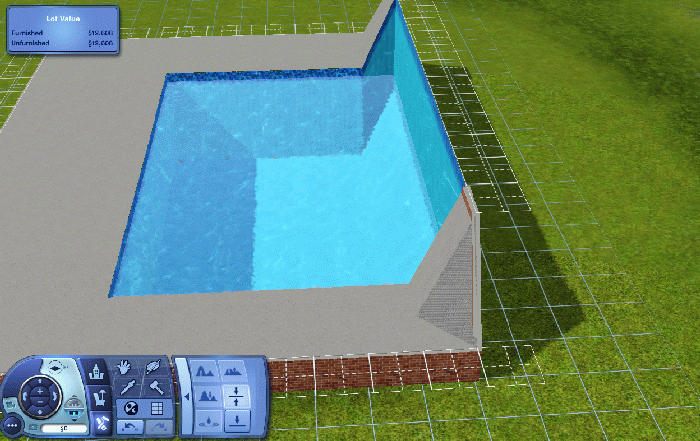
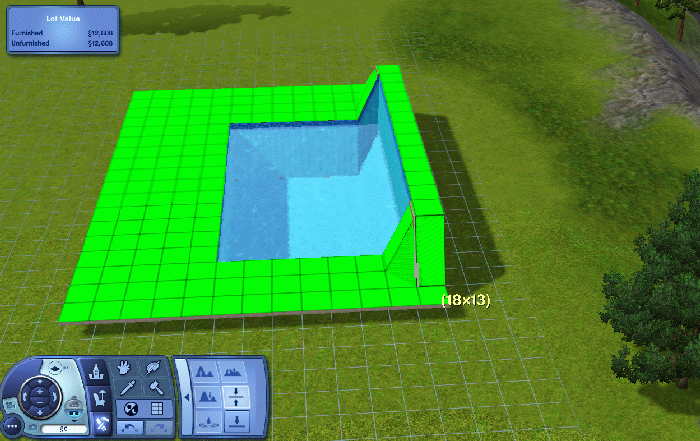
However you will get this ramp type ledge in the pool, it doesn't restrict swimming and is just an aesthetic issue really.
Remember to turn off constrainfloorelevation by putting true at the end instead of false.

If you really don't want that then instead of using the constrainfloorelevation cheat just use the normal flattern terrain tool to flatten the edges as close as you can.

Using moveobjects on and holding Ctrl+Alt place some plants, bushes or something to hide the gap. I used some lavender bush from World Adventures.

Tutorial 3: In a wall height foundation method
This method is more complicated to build. This method is perfect if you are on a flat Lot and maybe want to try a multilevel build or something like that, the only downside to this is that the Foundation has to be Wall height, which can be an issue because it looks a little odd, unless you edit the terrain which I will show you later.
Start by just adding a room, the size of your pool.

Go up a level and use the pool tool to place the Pool inside the Room such as this:

Then add another room around three sides, leave whichever side will be your edge of the pool open, you should end up with something like this.

Now open the cheat console and type constrainfloorelevation false into the cheat console, this allows the editing of wall heights and stuff normally restricted in building.
Build a foundation adjacent to the outer wall.

Now use the flatten terrain to drag from the top of the walls over the foundation to make the foundation the same height as the walls.


You can turn off the cheat now by typing constrainfloorelevation true into the cheat console.
Now would be a good time to build the rest of your foundation for your house. When I said earlier that it would look odd here you can see that it does.

However we can counter that by raising the terrain under the foundation and smoothing it off to end up with something like this:

Fill in the gaps between the pool and foundation if you have not done so already. That is all that there is to it, of course you can decorate and build around it so you're not done yet.
Tutorial 4: Cliffside Infinity Pool
The last method I'm going to show you is what I consider to be my favourite method, however the chances you will have a Lot suitable are slim, there are two such lots in Sunset Valley but you will have to bulldoze those, through Edit Town. This is the lot I am working with:

First things first is to make a flat area, this is the size of your pool roughly, make it slightly bigger than you want your pool to be.

Now simply pick a random set of stairs and place three of them down following on from each other such as below.


Then remove the stairs and flatten the area of your pool from the lowest flat square left from the bottom stairs.


Place a room in that new lower area, up to the edge of the cliff.

Now using Foundation you fill in the gaps and expand the foundation that will make up your house.


Now place your pool the same as below, the reason a gap is left between the pool and the foundation is that it doesn't go without using cheats and if it can be simple then keep it simple.

Then using a flooring tile cover the gap to the edge of your pool.

There is a visual issue with the terrain on the cliff, simply use the soften terrain tool to sort that out and to blend it back into being a side of a cliff.

Your pool is done, a quick and relatively simple method. Remember that you can also place Windows on pool walls that are connected to basements or the open air. In this case the side of the cliff, that is optional though but you might like to add it.

If you are feeling confident why not have a go at making a Step Infinity Pool with multiple levels?
| Edit Town | Edit Lots | Houses | Households | Basements/Multistory | Garages | Rooms |
| Pools | Roofs | Slopes | Stairs/Elevators | Wall Curving | Moving | Switch 'hoods |
Share Tips and FAQs (1)
Our Sims Forum is the place to go for faster answers to questions and discussions about the game. Use the form below to share your own experiences and provide helpful tips to other readers.
 Reply
Reply Flag
Flag 1
1 1
1

